
Barcode Generator Online Free – Code128, EAN, UPC & More
universal barcode & 2D code generator
Bulk sequential numbering
Appearance
Human-readable text
Padding & quiet zone
Advanced & export
Keyboard shortcuts
Barcode Generator – Create Free 1D Barcodes Online Instantly
If you run a shop, supermarket, warehouse, or online store, keeping track of products by hand slows everything down. Barcodes fix this by encoding machine-readable data such as a product number, SKU, or other identifier. Our barcode generator lets you create a barcode online, no software, no account, just enter your data, pick a format, and download.
What is a Barcode?
A barcode is a pattern of lines and spaces that represents information like a product number, SKU, or ISBN. When scanned, that data can be used by a point-of-sale, inventory, or other system to retrieve the related price, stock record, or product entry.
Try our QR Scanner, Barcode Scanner, and QR Generator to create, scan, and manage QR codes and barcodes online for free.
How Does a Barcode Generator Work?
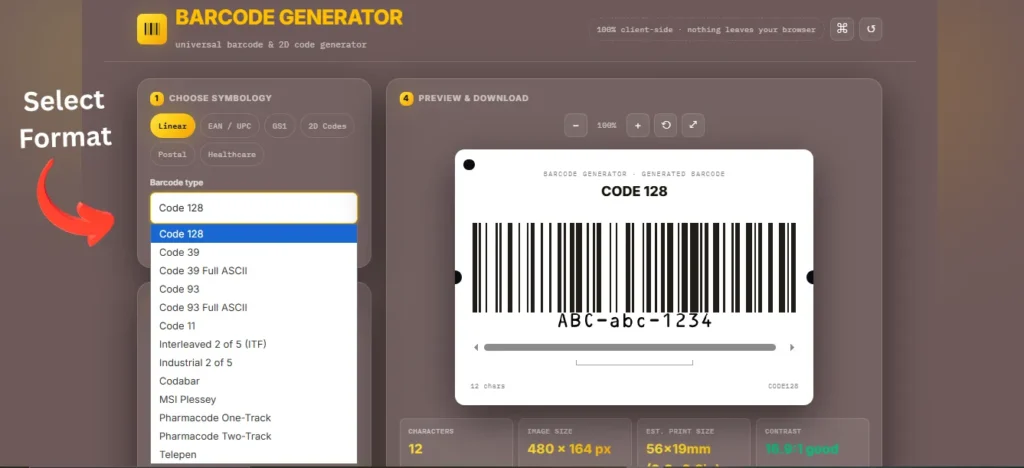
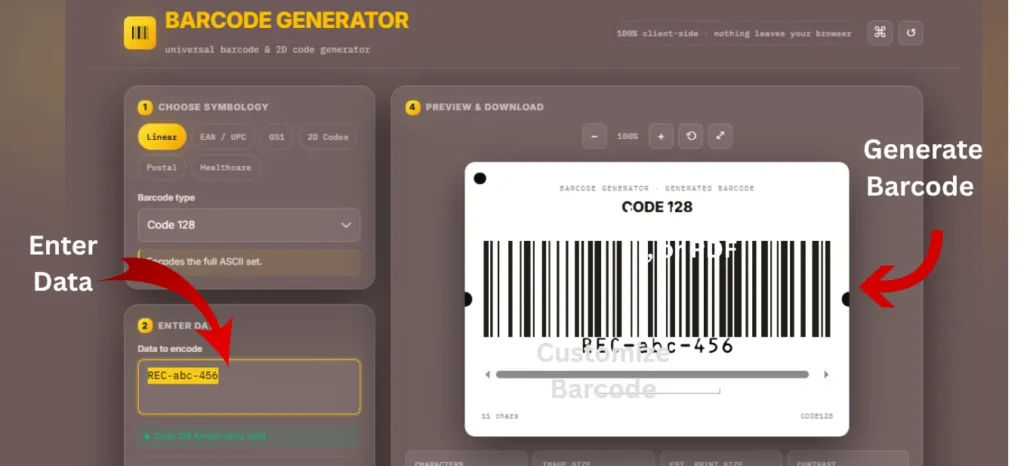
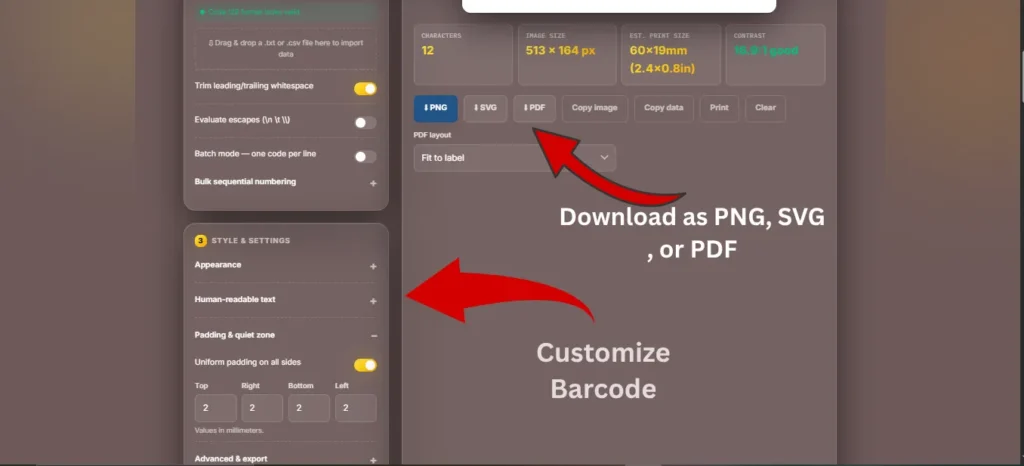
A barcode generator online makes it easy to create a scannable barcode in just a few simple steps:
- – Enter Your Data: Add a product number, SKU, ISBN, or any text or numeric string.
- – Select the Barcode Type: Choose the appropriate format, such as CODE128, EAN-13, or UPC-A.
- – Generate the Barcode: The tool converts your data into the correct barcode pattern instantly.
- – Preview the Code: Check that the barcode looks correct and the human-readable text matches your data.
- – Download the Barcode: Save your barcode in a suitable format, such as PNG, SVG, or PDF.
- – Print and Use: Add the barcode to product labels, packaging, shipping documents, or other materials.
No coding, design software, or barcode font installation is required. A browser-based barcode generator handles the technical encoding rules, making it easier to create accurate, scannable barcodes.
Features of Our Barcode Generator
- Free to Use: Generate barcodes without paying for core features.
- Fast Generation: Create barcodes instantly in your browser.
- Multiple Barcode Formats: Support popular formats for different use cases.
- No Registration Required: Generate and download barcodes without creating an account.
- Privacy Focused: Your barcode data is processed securely and not stored or sold.
- High-Quality Output: Generate clear, sharp barcodes suitable for printing.
- Mobile Compatible: Works smoothly on smartphones, tablets, and desktop devices.
- Browser-Based: No software, app, or installation is required.
- Easy Download: Save your generated barcode for labels, packaging, or other uses.
Supported Barcode Types and Usage
Different formats accept different data, and picking the wrong one is a common reason a code will not scan.
| Barcode Types | Allowed Data | Common Use |
| CODE128 | Letters, numbers, symbols | Inventory, logistics, general business |
| CODE39 | Uppercase letters, numbers, a few symbols | Warehouses, industrial tracking |
| EAN-13 | 13 digits, numeric only | Retail products |
| EAN-8 | 7 digits, numeric only | Small products, limited label space |
| UPC-A | 11 digits, numeric only | Retail in the US and Canada |
| UPC-E | Numeric only, compressed | Small packaging |
| ITF-14 | 13 digits, numeric only | Cartons, shipping |
ISBN is not a barcode format itself. It is a book identifier that is commonly represented in an EAN-13 barcode.
For EAN-13, UPC-A, and ITF-14, the last digit is a check digit calculated automatically. CODE128 and CODE39 are commonly used for internal tracking, while EAN and UPC are widely used for retail product identification.
Bulk Barcode Generator
If you need to create a large number of barcodes at once, our bulk barcode generator saves you time and effort. Simply upload a CSV or Excel file, and generate all your barcodes in one click, whether it’s for product listings, inventory, or shipping labels. This tool is especially useful for large stock or growing businesses where making each barcode manually just isn’t practical.
Where Are Barcodes Used?
Barcodes are commonly used for quick identification, tracking, and data entry across different industries, including:
- Retail: Product identification and checkout
- Warehouses: Inventory and stock tracking
- Shipping & Logistics: Parcel and shipment tracking
- Manufacturing: Parts and product tracking
- Healthcare: Medication, patient, and lab sample identification
- Libraries: Book check-in and check-out
- Asset Management: Tracking equipment and business assets
Barcode vs QR Code: What’s the Difference?
Barcodes and QR codes are both used to store machine-readable information, but they differ in structure, data capacity, and typical applications. A barcode is a 1D code designed primarily for product identification and tracking, while a QR code is a 2D code that can store more information and is commonly used for digital interactions.
| Feature | Barcode (1D) | QR Code (2D) |
|---|---|---|
| Structure | Parallel lines and spaces | Square grid of patterns |
| Data Capacity | Limited, typically suited to short identifiers | Higher capacity for URLs, text, contact details, and other data |
| Scanning | Laser or image-based barcode scanner | Smartphone camera or QR scanner |
| Common Uses | Retail, inventory, logistics, and product identification | Websites, digital menus, payments, Wi-Fi, and marketing |
| Data Access | Usually identifies an item within a business system | Can store information directly or link to online content |
| Scanning Direction | Generally read in one dimension | Read in two dimensions |
Which one should you use? Choose a barcode when you need reliable product identification, inventory tracking, or point-of-sale scanning. Choose a QR code when you need to provide customers with quick access to URLs, digital information, or interactive content.
How to Print Barcodes Correctly
Here’s something that trips up a lot of people: a perfectly generated barcode can still fail to scan if it’s printed badly. The generator did its job — the printer or the label material undid it. A few things matter more than people expect:
- Size: don’t shrink a barcode below its minimum readable size; scanners struggle with anything too small
- Resolution: print at 300 DPI or higher for crisp, non-blurry lines
- Quiet zone: leave blank white space around the barcode; cramming text or graphics too close causes scan failures
- Contrast: stick with black bars on a white background; low-contrast colour combinations are a common cause of scan errors
Common Barcode Mistakes to Avoid
Almost every barcode problem I’ve seen traces back to one of these five things:
- Wrong format: using UPC-A when your retailer requires EAN-13, or vice versa
- Low print quality: printing on a low-resolution printer or worn-out ink ribbon
- Barcode too small: squeezing it into a tight label space until it’s unreadable
- Incorrect data entry: a single wrong digit means the scanner pulls up the wrong product
- Stretching the image: resizing a barcode image disproportionately distorts the bar widths and breaks the encoding
Why Barcodes Fail to Scan
Even a correctly generated barcode can fail to scan because of printing, formatting, or data issues. Common causes include:
- Low Resolution: Blurry or unclear bars can prevent scanners from reading the code.
- Incorrect Resizing: Stretching or compressing a barcode can change the bar width and make it unreadable.
- Wrong Barcode Format: Some formats accept only specific types of data. For example, EAN-13 requires numeric data.
- Invalid Check Digit: Formats such as EAN-13, UPC-A, and ITF-14 use check digits to verify that the barcode was read correctly.
- Missing GS1 Identifier: Retail products often require a valid GTIN assigned through GS1.
- Poor Printing: Insufficient contrast, incorrect size, or missing quiet zones can cause scanning problems.
Frequently Asked Questions
For internal uses such as SKUs, inventory labels, and asset tracking, you can create your own numbering system. Retail products usually require a valid GTIN assigned through GS1.
Yes. You can use our free barcode generator to create supported barcode formats without registration or paid software.
For retail products, each unique product or product variation generally needs its own GTIN. For example, different sizes or colors may require separate product identifiers.
No. A barcode number is the data or identifier, while the barcode image is the machine-readable representation of that number.
Common causes include incorrect sizing, poor print quality, low contrast, damaged bars, or using a barcode format that does not support the data you entered.
Yes. Many modern smartphones can scan common barcodes using compatible camera or scanning apps, although dedicated barcode scanners may work better for business and warehouse use.
A barcode image itself does not normally expire. However, the status and ownership of a retail product identifier depend on the organization that issued the number and the applicable standards.
Not for every use case. Internal inventory, asset tracking, and other private systems can use formats such as CODE128 or CODE39 without a GS1-issued retail GTIN. Retail products generally require GS1-assigned identifiers.
For retail identification, each distinct product should have its own appropriate GTIN. Reusing the same retail identifier for different products can cause identification and inventory problems.
Yes, but avoid stretching or compressing the barcode unevenly. Keep the correct proportions, adequate size, clear contrast, and surrounding quiet zone so scanners can read it reliably.
Conclusion
Barcodes give shops, warehouses, and online sellers a fast way to identify products and manage stock. Enter your data, choose the right format, generate the code, and download it, that covers most everyday labeling needs.