
QR Code Generator Free – Custom Design, No Expiry
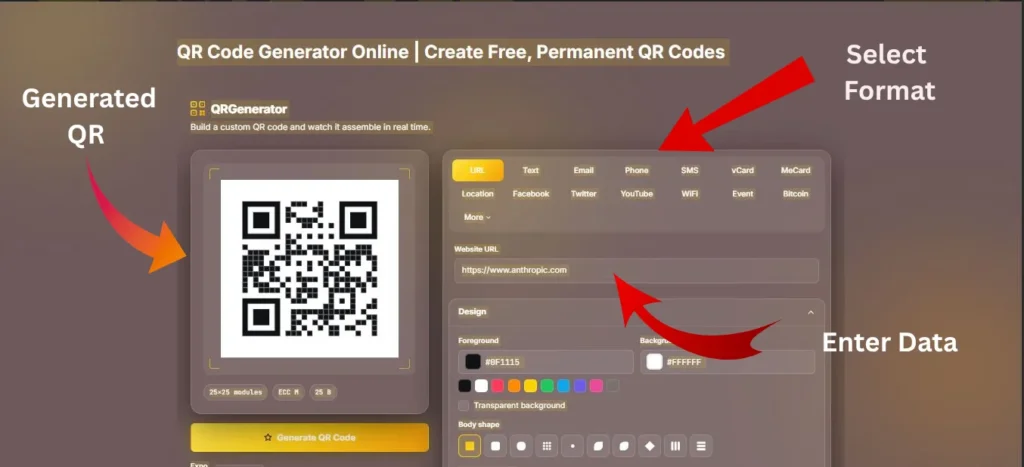
Build a custom QR code and watch it assemble in real time.
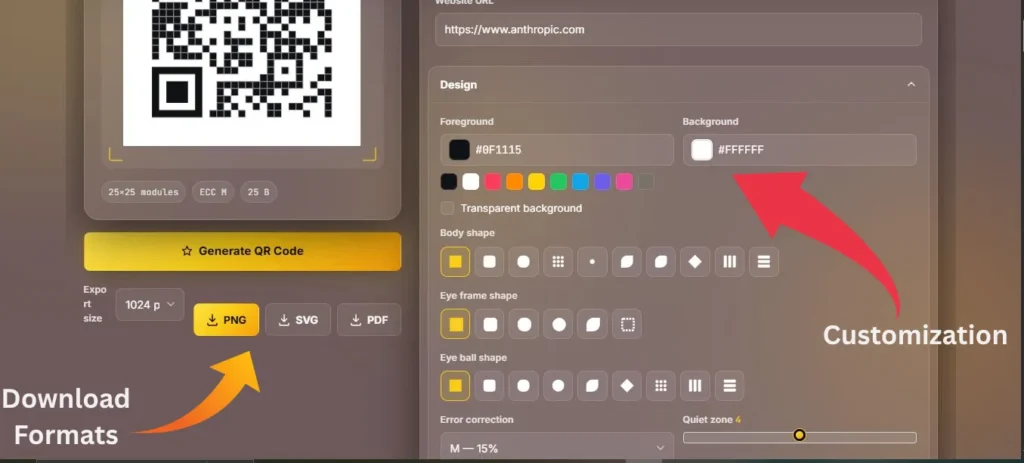
Design
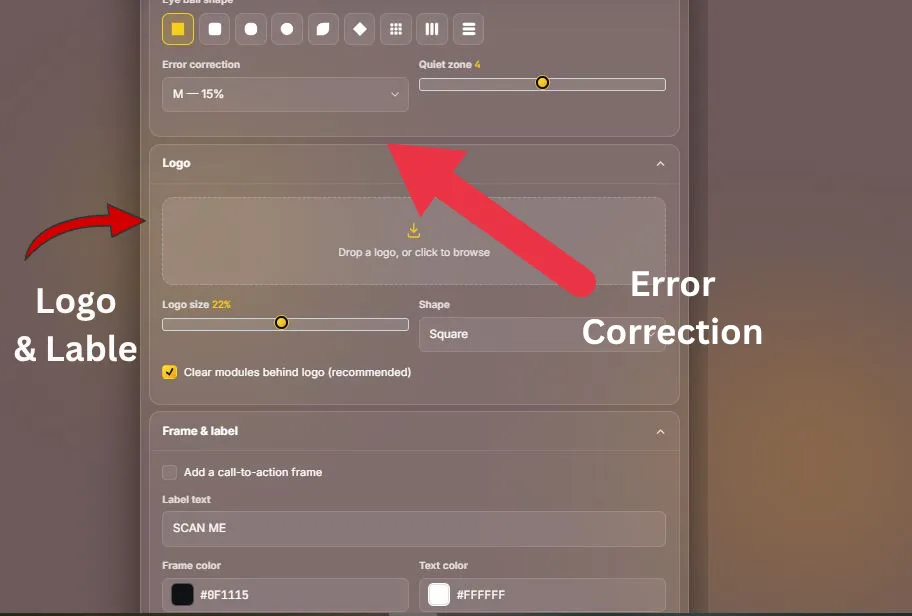
Logo
Frame & label
A QR code generator is a free online tool that turns text, links, contact details, WiFi credentials, or other data into a scannable QR code image. You enter your content, customize the design, and download the code as PNG, SVG, or PDF. The code works permanently and can be scanned by any phone camera — no signup or app needed.
QR Code Generator: The Complete Guide to Creating Custom, Free QR Codes Online
Sharing a website, WiFi password, contact details, or business information shouldn’t mean making people type long links or search for the right details. A QR code turns that extra effort into a quick scan, making it easier for customers, guests, and visitors to access information instantly. Whether you’re creating a code for a menu, business card, website, WiFi network, or marketing material, a QR Code Generator Online gives you a simple way to create one in seconds. With this Free QR Code Generator, you can customize your design, add your logo, and download a high-resolution QR code ready for digital use or printing. No sign-up, complicated setup, or unnecessary steps, just create, customize, and share.
What is a QR Code Generator?
A QR Code Generator turns text, URLs, contact details, WiFi information, and other data into a scannable QR code. Simply scan it with a smartphone camera to access the stored information instantly. A reliable QR Code Maker creates clear, easy-to-scan codes using standard QR encoding.
Try our QR Scanner, Barcode Scanner, and Barcode Generator to create, scan, and manage QR codes and barcodes online for free.
How to Create a Custom QR Code Step-by-Step
Creating a custom QR code takes just a few simple steps:
- Select a Content Type: Choose URL, vCard, WiFi, Social Media, Text, or another supported format. Using the right data type helps the QR code trigger the appropriate action when scanned.
- Enter Your Details: Add your website link, contact information, WiFi credentials, Paypal account , payment details, or text. Keep long URLs and unnecessary text to a minimum to avoid creating an overly dense QR pattern.
- Customize the Design: Adjust the foreground and background colors, choose custom module shapes, or upload your logo. Keep strong contrast between the QR code and its background, maintain a clear four-module quiet zone, and avoid placing text over the pattern.
- Add a CTA Frame: Add a frame with text such as “Scan Me” or “View Menu” to clearly tell users what to do. Keep the label outside the QR pattern so it doesn’t interfere with scanning.
- Generate and Download: Create your QR code and download it as PNG, SVG, or PDF based on your needs. SVG is ideal for large-format printing because it stays sharp at any size. Before printing or sharing, test your QR code on multiple smartphones to make sure it works as expected.
QR Code Types You Can Generate (Website, Wi-Fi, vCard & More)
Most people think of QR codes as just links to a website, but they can hold a lot more than that:
| QR Code Type | Best For |
|---|---|
| URL QR Code | Websites, landing pages, and web links |
| WiFi QR Code | Sharing network access without manually typing a password |
| Text QR Code | Sharing short messages and information |
| Email QR Code | Opening a pre-filled email |
| Phone Number QR Code | Making a phone call quickly |
| vCard QR Code | Digital contact and business cards |
| MeCard QR Code | Lightweight contact information |
| WhatsApp QR Code | Opening a WhatsApp conversation |
| SMS QR Code | Opening a pre-filled text message |
| Social Media QR Code | Profiles, pages, and social links |
| Location QR Code | Google Maps locations and directions |
| Payment QR Code | Payment information or supported payment links |
| Event QR Code | Event and calendar information |
| Crypto Wallet QR | Cryptocurrency wallet addresses and payment information |
| Menu QR Code | Digital restaurant and cafe menus |
| Skype QR Code | Opening supported Skype contact or call links |
These formats can be useful for business cards, resumes, portfolios, flyers, posters, menus, packaging, marketing materials, reviews, surveys, feedback forms, events, and customer contact points
Static QR Code VS Dynamic QR Codes( What You Need to Know)
Static QR Code: A static QR code stores the information directly inside the code, so the content cannot be changed after it is generated. It is ideal for fixed information such as WiFi details, contact information, text, or a permanent URL.
Dynamic QR Code: A dynamic QR code uses a redirect link, so the destination can be changed later without replacing the printed QR code. It can also support features such as scan tracking and analytics through a dynamic QR service.
Error Correction Levels & Adding a Logo
QR codes use Reed-Solomon algorithms to recover missing or covered data. Selecting the correct error correction level ensures reliable scanning when adding custom designs or brand images.
| Correction Level | Data Recovery | Best Application |
|---|---|---|
| Level L (7%) | Recovers up to 7% | Best for clean text or simple web links without visual alterations |
| Level M (15%) | Recovers up to 15% | Balanced option for simple color changes |
| Level Q (25%) | Recovers up to 25% | Recommended when adding central logos or custom eye patterns |
| Level H (30%) | Recovers up to 30% | Maximum safety for heavy logo overlays and outdoor print banners |
Keep your logo under 25% of the total QR code size for best results.
QR Code Size & Printing Guide
Following correct sizing rules ensures your printable QR code scans easily across all camera types and screen sizes:
| Physical Application | Minimum Print Size | Recommended Export Format |
|---|---|---|
| Business Cards & Small Tags | 2.0 cm × 2.0 cm (0.8″ × 0.8″) | PNG (1024px) or SVG |
| Flyers, Menus & Magazines | 3.0 cm × 3.0 cm (1.2″ × 1.2″) | PNG (2048px) or High-Res PDF |
| Posters, Banners & Packaging | 10.0 cm × 10.0 cm (4.0″ × 4.0″) | SVG Vector or PDF |
QR Code vs Barcode: Which Is Best for What?
| Feature | QR Code (2D) | Barcode (1D) | QR Code Best For | Barcode Best For |
|---|---|---|---|---|
| Structure | Square matrix of dots and patterns | Parallel lines and spaces | Digital information sharing | Product identification |
| Data Capacity | Stores more data, including URLs, text, and contact details | Stores relatively small amounts of data | URLs, WiFi, contacts, text, and other rich data | Product numbers and identifiers |
| Common Data | URLs, WiFi, text, email, phone, contacts, payments | Product numbers, SKUs, inventory identifiers | Digital content and customer interactions | Retail and inventory data |
| Scanning | Smartphone camera or 2D scanner | Barcode scanner or camera-based scanner | Mobile-friendly scanning | Dedicated barcode scanning |
| Scanning Direction | Can generally be scanned from different orientations | Usually scanned across the linear pattern | Signs, menus, packaging, and displays | Checkout and warehouse environments |
| Damage Resistance | Error correction can help recover partially damaged data | Damage can make the code difficult to read | Printed materials exposed to some wear | Clean product labels and packaging |
| Typical Uses | Websites, menus, WiFi, business cards, events, marketing | Retail products, inventory, logistics, stock management | Digital sharing and customer engagement | Product tracking and stock management |
| Best Choice | Better for sharing digital information and mobile actions | Better for product identification and inventory workflows | Websites, WiFi, menus, contacts, marketing | Products, SKUs, inventory, retail, logistics |
Download Formats: PNG, SVG, and PDF
Choose the format that fits your project.
PNG: Best for websites, social media, email, presentations, and general digital use. Download at 1024 px or higher for better quality.
SVG: Best for business cards, brochures, packaging, posters, and large-format printing. SVG files scale without becoming blurry.
PDF: Useful for print workflows, sharing with designers, and placing the QR code into print-ready documents.
For large printed materials, SVG is usually the safest choice because it remains sharp at any size. Before sending artwork to print, open the downloaded file, confirm that the logo and colors look correct, and scan the final design.
Data Privacy
Your QR code data is processed directly in your browser, so it isn’t uploaded to our server for generation. Your URLs, contact details, WiFi credentials, and text stay on your device while you create the code. No account or registration is required to use the generator. However, a QR code is not private once you share it—anyone who scans it can access its contents. Avoid adding passwords, confidential documents, or other sensitive information to public QR codes.
Why Choose This QR Code Generator?
Create free static QR codes directly in your browser with no sign-up, usage limits, or hidden costs. Customize colors, shapes, logos, CTA frames, and other design elements to match your brand. Download high-resolution PNG, SVG, or PDF files for digital use or professional printing. Your data is processed locally in your browser, giving you a simple, private, and flexible way to create QR codes in seconds.
QR Code Generator FAQs
No, all static QR codes created with this tool are permanent and never expire.
Yes, our online QR code generator is 100% free with no hidden charges or scan limits.
Only if it’s dynamic. A static code is locked in—you’d need to create a new one to change anything.
Up to around 4,296 alphanumeric characters, though shorter is always better for scan reliability.
Yes. You can create QR codes for WiFi, vCard, URLs, text, email, phone numbers, WhatsApp, social media, locations, events, menus, payments, and other supported formats.
SVG for anything getting printed, since it scales without losing quality. PNG works fine for web and digital use.
Yes, especially if you download in SVG or high-resolution PNG.
Scanning itself works offline, but if the code links to a website, you’ll need a connection to actually load it.
Generally, yes — just be cautious with codes from unfamiliar or unverified sources.
Yes, the tool works fine on mobile, no desktop required.
Static is fixed and can’t be tracked. Dynamic can be edited after the fact and gives you scan data.
Yes, just use a higher error correction level (Q or H) so the code still scans properly with the logo covering part of it.
Not anymore. Most phone cameras scan them natively without any extra app.
Yes. You can create payment QR codes for supported payment information or payment links. The person scanning the code can then access the payment details or linked payment page.
Final Conclusion
A QR code should make sharing information easier, not make the process harder. Create yours in seconds, give it the look you want, test it, and download it in a sharp, ready-to-use format. Whether it’s going on a business card, restaurant menu, WiFi sign, product package, or marketing campaign, your QR code is ready to connect the physical world to the digital one with just one scan.